3D Printing for Aircraft Parts

Derrick

Member
Not really using 3D printed parts, rather using 3D printed parts to make parts...

I have found that 3D printed parts can be a huge help when it comes to tooling and fixturing, to this end I will try to keep this thread up to date with parts that I find useful.

First up we have the "Magic Washers"... these will be used to make the forms that make all the ribs, so indirectly a 3D printed part used to make nearly every other part! Kind of neat to think about.

If you have access to a 3D printer and are interested in the files I am willing to share, I tried to upload here; but it appears that files with the extension .stl are restricted by the forum. Who would be a good point of contact to get this changed?
 

Attachments

  • photo6979.jpg
    photo6979.jpg
    1.4 MB · Views: 1
  • photo6980.jpg
    photo6980.jpg
    1.2 MB · Views: 1
  • Magic_Washers.stl
    Magic_Washers.stl
    12.1 MB · Views: 1
Last edited:
Great idea, can you please try the upload now? I set a max size of 5mb but if that is too small let me know and we'll change it. By default, file extension types are all excluded. A few are allowed by exception, rather than the other way around. But we can always change it when there is a good reason to.
 
I tried to load again, but my file is large, when generating STL files (especially ones with circular features) I increase the number of triangles, my file is just a little over 12MB.

"Your file of 12.08 MB exceeds the limit of 4.77 MB."
 
Not really using 3D printed parts, rather using 3D printed parts to make parts...

I have found that 3D printed parts can be a huge help when it comes to tooling and fixturing, to this end I will try to keep this thread up to date with parts that I find useful.

First up we have the "Magic Washers"... these will be used to make the forms that make all the ribs, so indirectly a 3D printed part used to make nearly every other part! Kind of neat to think about.

If you have access to a 3D printer and are interested in the files I am willing to share, I tried to upload here; but it appears that files with the extension .stl are restricted by the forum. Who would be a good point of contact to get this changed?

since Corona is keeping us home...i thought Id start learning CAD and make up some files..i downloaded Free Cad, what do you think of that program is it up to the task of making wing shapes and such.

Any recommendations on good YouTube videos to watch to learn the art, I`m really only interested in making wing shapes with it. Not really doing 3d shapes or anything complicated.

If anyone has recommendations or tips...Im all ears...
 
Last edited:
Depends how deep you want to go. Unless you want to create some basic quick n dirty models, I would recommend Solidworks. It's the industry standard, highly compatible and well supported. And last time I checked for EAA folks, which most of us are, it's free.
 
Thanks for all the tips...

i was thinking of making up some 3d templates for rib formers and blanks.... donating them to Jared .... the Bearhawk could really use a builder assist package


help generate some revenue

he could sell it to registered plans holders.. the forms printed out ready to glue to wood

anything I make though ... Be a good idea you guys double check
 
Last edited:
Thanks for all the tips...

i was thinking of making up some 3d templates for rib formers and blanks.... donating them to Jared .... the Bearhawk could really use a builder assist package


help generate some revenue

he could sell it to registered plans holders.. the forms printed out ready to glue to wood

anything I make though ... Be a good idea you guys double check

Perhaps a good way to do this would be to have a Beartracks article about your journey. You'd be welcome to post any files here. We've updated the forum permissions to allow the .stl files here, and can also make other types available if you need.
 
Solidworks is free with an EAA membership, but Fusion 360 is also free as long as you aren't using it for commercial purposes. I use Fusion because it has CAM capabilities for use with my CNC router.
 
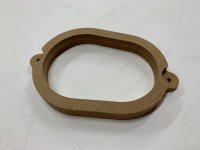
Not 3D printing this time, but along the same lines... it could very well have been printed (the CNC was faster though at about 15 min to subtract material).

The story behind the part...

I tried making the cutout using traditional means... a jig saw with filing and sanding, a fly cutter with sanding, as well as careful router table free hand to sneak up on the line to sand. Needless to say none of these produced results that I was happy with, so I jumped into Fusion 360 and sketched up this part and then created the CAM and sent the Gcode to my CNC router, the part worked perfectly.

The part was positioned using the holed tabs traced, mostly cut out with holes followed by jig saw, then to the router table with a flush cut bit using the part as the template.

router template.jpg - Click image for larger version  Name:	router template.jpg Views:	0 Size:	933.3 KB ID:	53648
The template next to the blanks for ribs 1 thru 5:
template and parts.jpg - Click image for larger version  Name:	template and parts.jpg Views:	0 Size:	1.90 MB ID:	53649
 

Attachments

Does anyone know how they do the pre punched holes in the RV and Zenith planes...software-CNC-forming process

just curious, as its almost magic how the holes line up between the skins and ribs.
 
They use CNC routers to drill the skins. Drilling and routing are just different instructions. It requires machines with high accuracy given that alignment must be very accurate between mating parts,
 
wanted to thank the guys here for their tips and hints..

I downloaded solid works and fusion 360

played around with it and watched some youtube videos and once you get up to speed you can create some great stuff..

made a sample rib in about 30mins....

Such a rewarding process...

Click image for larger version  Name:	IMG_2843.JPG Views:	0 Size:	1.25 MB ID:	54655
 
Last edited:
Not 3D printing this time, but along the same lines... it could very well have been printed (the CNC was faster though at about 15 min to subtract material).

The story behind the part...

I tried making the cutout using traditional means... a jig saw with filing and sanding, a fly cutter with sanding, as well as careful router table free hand to sneak up on the line to sand. Needless to say none of these produced results that I was happy with, so I jumped into Fusion 360 and sketched up this part and then created the CAM and sent the Gcode to my CNC router, the part worked perfectly.

The part was positioned using the holed tabs traced, mostly cut out with holes followed by jig saw, then to the router table with a flush cut bit using the part as the template.


The template next to the blanks for ribs 1 thru 5:

I`m looking at the part(file) you created in fusion 360

...so this let you create the odd shaped oval we see in the photo...wow...looks very professional...bravo..
 
Last edited:
wanted to thank the guys here for their tips and hints..

I downloaded solid works and fusion 360

played around with it and watched some youtube videos and once you get up to speed you can create some great stuff..

made a sample rib in about 30mins....

Such a rewarding process...


Oh oh...

i got out a caliper and started measuring my creation

the part is about 10 inches long and few inches wide...

I measured the rib width wise and all lines exactly accurate .... but the length of the part is 3mm or about 1/16 too long....the error got worse the farther along the part you measured...

usually you could compensate for that by scale printing at 99% or lower ... but it’s correct in one direction and not the other..so it won’t scale evenly

its probably my printer... being residential type.. it’s not meant for super accuracy ...but I thought I’d bring up this point as there is a possibility that printing can skew the part a little or a lot depending... meaning you have to double check everything even if it’s computer created

Next step is to hit a commercial printer to make copy and measure that

BTW how accurate are those home brew CNC machines?
what sort of tolerances do you expect

for those out there that do blue prints and things like that... is there a type of printer to ask for or are most print house equipment up to the job?
 
Last edited:
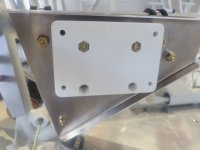
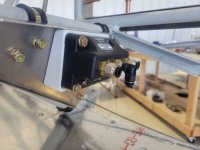
Looking for good places to mount the GSU 25 ADHRS modules, so thought just under the seats may be a good spot. Made a couple plates to clamp to the main cross bars and measured the angle relative to the lower longeron horizontal datum. Turns out 12.5 degrees is what I measured. So I printed some angle blocks from ABS-GF and embedded some AN3 nylock nuts inside. Think it will work well. Very solid mounting and they are within 1 degree of aircraft axes.

20250831_113501_resized.jpg 20250831_113507_resized.jpg
 
Back
Top